Imports in Solidity
February 21, 2025 · 7 min read
Introduction
While completing a FreeCodeCamp course on Solidity, I initially struggled to understand imports. After some digging, I realized there are mainly three ways to import in Solidity:
- Local imports
- Import through GitHub (works only in Remix)
- Import in Brownie
Let's walk through each.
1. Local Imports
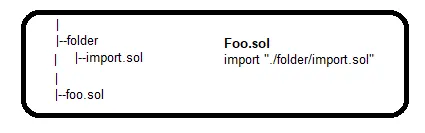
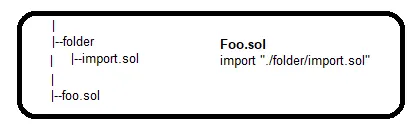
You can import both local and external files in Solidity.
For example,
2. Import Through GitHub (Works only in Remix)
There are many other ways to import other than GitHub in Remix. But I found this one too easy to follow. You just need to copy the GitHub URL pointing to the contract and paste it after import. Please find below e.g.

3. Import in Brownie
Brownie is a great package for smart contract development. It is a Python-based development and testing framework for smart contracts targeting the Ethereum Virtual Machine.
There are two steps to follow:
Adding Dependency
To import a smart contract/source from a package, one needs to declare the dependencies by adding a dependencies field to your project configuration file. Brownie will download that dependency in the .brownie/packages folder during compilation.
The format to add dependency is [ORG]/[REPO]@[VERSION].
For e.g. let's import a smart contract from the Chainlink GitHub repo. To do so, we need to define dependency in the config file.
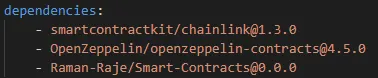
One thing to remember is that the repo must have a release version and tag associated with it. When you execute brownie compile, Brownie will download the package in the below location on your Windows machine.
Path Remappings
Now we need to do path remappings. Brownie exposes this functionality via the compiler.solc.remappings field in the configuration file. Each value under remappings is a string in the format prefix=path.
In simple words, it tells Brownie to search for a given prefix at a specific path. For e.g.
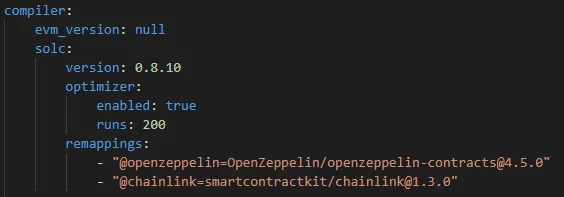
Whenever @chainlink occurs in an import, it will tell Brownie that it refers to smartcontractkit/chainlink@1.3.0.
import '@chainlink/contracts/src/v0.8/interfaces/AggregatorV3Interface.sol';

import 'smartcontractkit/chainlink@1.3.0/contracts/src/v0.8/interfaces/AggregatorV3Interface.sol';
The above imports refer to the same thing.